
Preparing a Project for Automatic Workspace Configuration
Workspace Manager can automatically provision new workspaces with code, databases, and configuration—ready to use without manual setup. This guide walks you through preparing your project for automatic initialization.
Connecting Your Git Repository
Section titled “Connecting Your Git Repository”Before workspaces can auto-initialize, you need to connect a Git repository at the project level. Only project administrators can perform this setup.
- Navigate to your project’s configuration page
- Click the Repositories tab
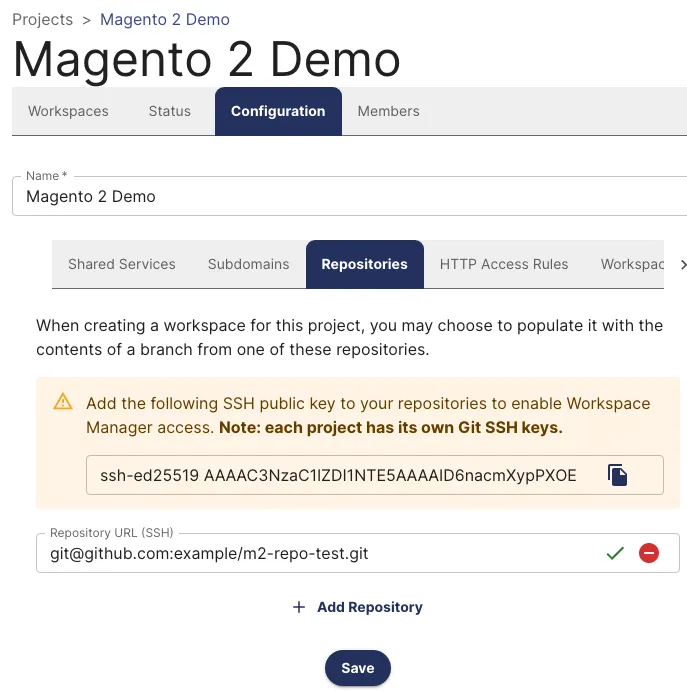
- Copy the SSH public key displayed on the page
- Add this key as a Deploy Key in your Git repository settings
- Back in Workspace Manager, click Add Repository and paste your repository’s SSH URL
- Click the green checkbox to verify the connection
- Click Save
Your repository is now ready to initialize workspaces.
Automatic Database Provisioning
Section titled “Automatic Database Provisioning”Every workspace gets its own database automatically, named ws_{workspaceId}. Access this name in your code using the $WORKSPACE_DATABASE_NAME environment variable.
Seeding Databases with Starter Data
Section titled “Seeding Databases with Starter Data”Workspace Manager can populate new databases with starter data from SQL dumps stored in the /shared/databases folder. The system selects the appropriate dump file based on your branch or tag:
Branch/tag-specific dumps: If you create a workspace from a branch named 245_upgrade, the system looks for /shared/databases/245_upgrade.sql.gz
Default dump: If no branch-specific dump exists, the system uses /shared/databases/default.sql.gz
Creating a database dump:
mysqldump \ --single-transaction \ --skip-column-statistics \ --no-tablespaces \ --set-gtid-purged=OFF \ -h db \ -u root \ -p \ {database_name} | gzip > default.sql.gzThe dump file must be gzipped SQL that can be loaded with the zcat command.
Flag explanations:
--single-transaction: Creates a consistent snapshot without locking tables--skip-column-statistics: Avoids warnings about column statistics (MySQL 8.0+)--no-tablespaces: Prevents tablespace access warnings--set-gtid-purged=OFF: Avoids GTID-related errors when importing
Configuring Files and Symlinks
Section titled “Configuring Files and Symlinks”Configuration files and media assets that aren’t stored in your repository can be automatically copied or linked during workspace initialization. Define these in /shared/workspaceInit.yaml:
# Files to copy from /shared into the repositoryfiles: []
# Files to symlink from the repository to /sharedsymlinks:  - auth.json  - pub/media
# Template files to render (see below)templates:  - app/etc/env.php
Configuration Options
Section titled “Configuration Options”files: Copies files from /shared into the cloned repository folder
symlinks: Creates symbolic links from the repository to files under /shared
templates: Generates files from Golang templates (see Workspace Initialization File Templates)
Initialization Hooks
Section titled “Initialization Hooks”Workspace Manager executes shell scripts at specific points during initialization, giving you fine-grained control over the setup process. Hook scripts can live in two locations:
/shared/hooks(available for all hooks)ordin/subfolder in your repository (not available for pre-clone hooks)
Hook scripts must have a .sh extension and are executed with bash. Some hooks receive command-line parameters.
General Hooks
Section titled “General Hooks”These hooks run for all workspace types, in this order:
ws-before-git-clone.sh $workspace_repo $clone_dir $ref_name(only in/shared/hooks)ws-after-git-clone.sh $workspace_repo $clone_dir $ref_namews-before-ref-checkout.sh $workspace_repo $clone_dir $ref_namews-after-ref-checkout.sh $workspace_repo $clone_dir $ref_namews-before-db-create.sh $db_namews-after-db-create.sh $db_namews-before-db-import.sh $db_name $import_filews-after-db-import.sh $db_name $import_filews-before-file-copy.shws-after-file-copy.sh
Adobe Commerce Hooks
Section titled “Adobe Commerce Hooks”Additional hooks for Adobe Commerce projects:
ws-before-composer-install.sh $composer_json_filews-after-composer-install.sh $composer_json_filews-before-m2-setup-upgrade.sh $m2_rootws-after-m2-setup-upgrade.sh $m2_root
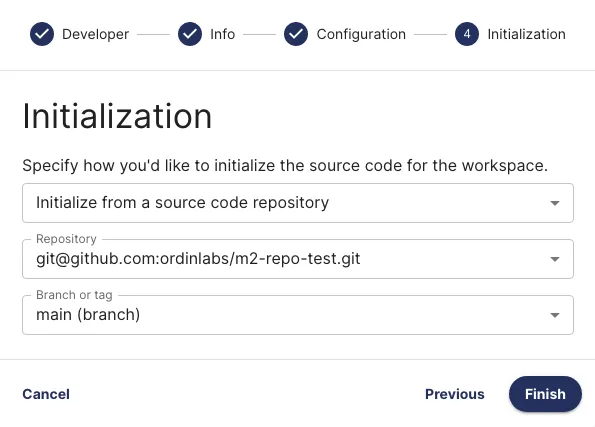
Creating Workspaces from Git
Section titled “Creating Workspaces from Git”Once your project is connected to a Git repository, developers can select a specific branch or tag when creating a workspace.
Monitoring Initialization
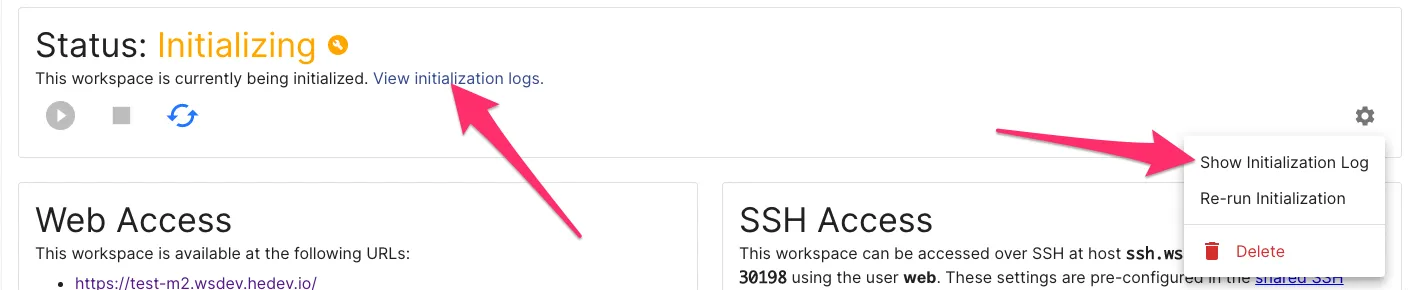
Section titled “Monitoring Initialization”Track the initialization process from the Workspace Status page:
- During initialization, the workspace status shows “Initializing”
- The workspace cannot be started until initialization completes
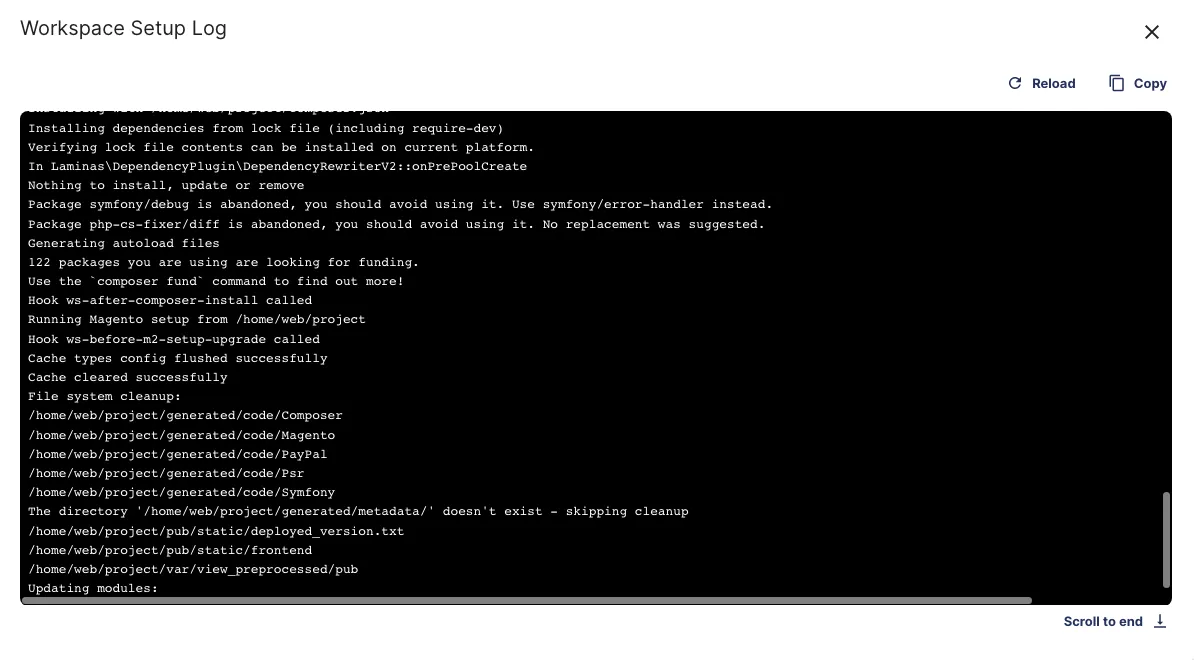
- View detailed logs by clicking the gear dropdown and selecting Show Initialization Log